
How to Use Google Pomelli: Tutorial, Prompts and Examples (2026 Update)
Generate professional social media designs in minutes using Google’s free AI tool
What’s new since this tutorial was recorded (updated September 2026):
- Animate (January 2026) turns a static design into a short on-brand video.
- Photoshoot (February 2026) turns a single product photo into studio and lifestyle shots.
- Catalog stores your products so campaigns and photoshoots can be built around them.
- Availability grew from four countries at launch to more than 170 in March 2026.
- It is still free. The setup and editing steps below work the same way.
What is Google Pomelli?
Google Pomelli is a revolutionary free AI tool from Google Labs that helps small businesses create on-brand social media assets at scale. Unlike generic design tools, Pomelli extracts your brand DNA—including fonts, colors, logos, and visual style—directly from your website and uses it to generate unlimited campaign designs that maintain brand consistency.
Getting Started with Google Pomelli: Step-by-Step Setup
Accessing Google Pomelli
Getting started with Pomelli takes less than a minute:
- Navigate to labs.google.com/pomelli (or find it in the Google Labs experiments list)
- Sign in with your Google account
- Click to launch the tool—no installation required
- Watch the demo video to understand capabilities
The tool runs entirely in your browser and requires no credit card or premium subscription. Google provides this as a free experiment to showcase their AI capabilities.
Extracting Your Brand DNA
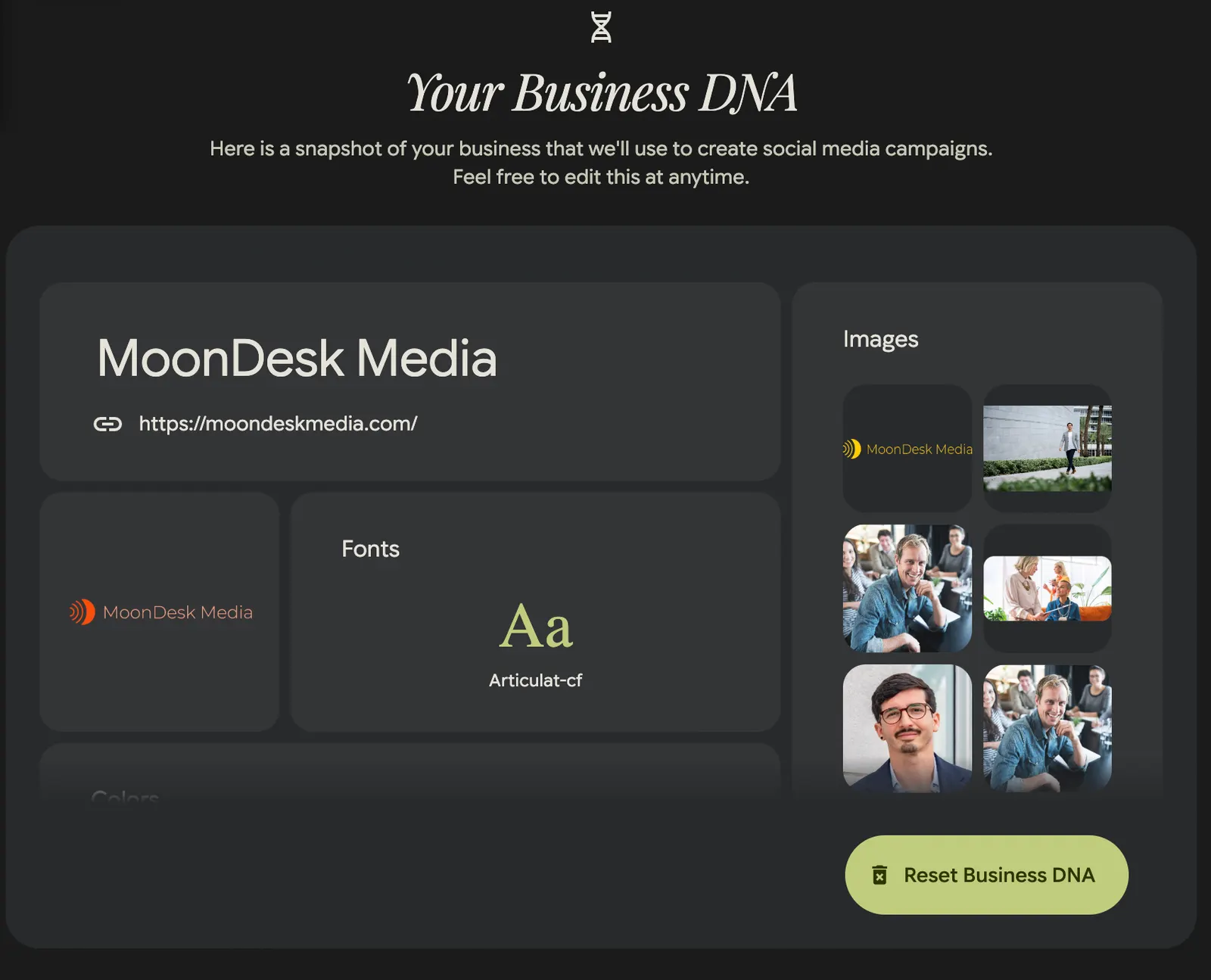
The foundation of Pomelli’s effectiveness lies in its brand DNA extraction feature. When you first launch a new project, the tool prompts you to enter your website URL. Here’s what happens next:
What Pomelli Extracts:
- Logo files and brand marks
- Typography choices and font families
- Color palette and hex codes
- Representative imagery from your site
- Overall visual style and design patterns
Pro Tip: After the initial extraction, you can upload additional brand images that don’t appear on your website. This gives Pomelli more visual options when generating campaign assets, especially useful for seasonal campaigns or specific product launches.
The accuracy of this extraction is impressive. In testing with MoonDesk Media’s website, Pomelli correctly identified all primary and secondary brand colors, extracted the exact fonts used in headers and body copy, and pulled representative images that captured the brand’s professional consulting aesthetic.
Creating Your First Campaign: A Real-World Example
Defining Campaign Objectives
Rather than starting with design specifications, Pomelli begins with campaign strategy. Here’s how to structure your campaign prompt for maximum effectiveness:
Campaign Example: Promoting an AI Tool for Podcast Hosts
For a campaign promoting the Podcast Interview Question Optimizer (a free AI tool that helps podcast hosts generate better questions using journalism best practices), the prompt structure looks like this:
“Generate ideas for an ad campaign to drive qualified traffic to my free AI tool, the Podcast Interview Question Optimizer. This AI tool helps podcast hosts generate great questions to ask their guests or improve the questions they are planning to ask using journalism best practices.”
Why This Prompt Works:
- Specifies the goal (drive traffic)
- Identifies the target audience (podcast hosts)
- Describes the tool’s core benefit (better questions through journalism practices)
- Clarifies the offer type (free tool)
Understanding Pomelli’s Creative Process
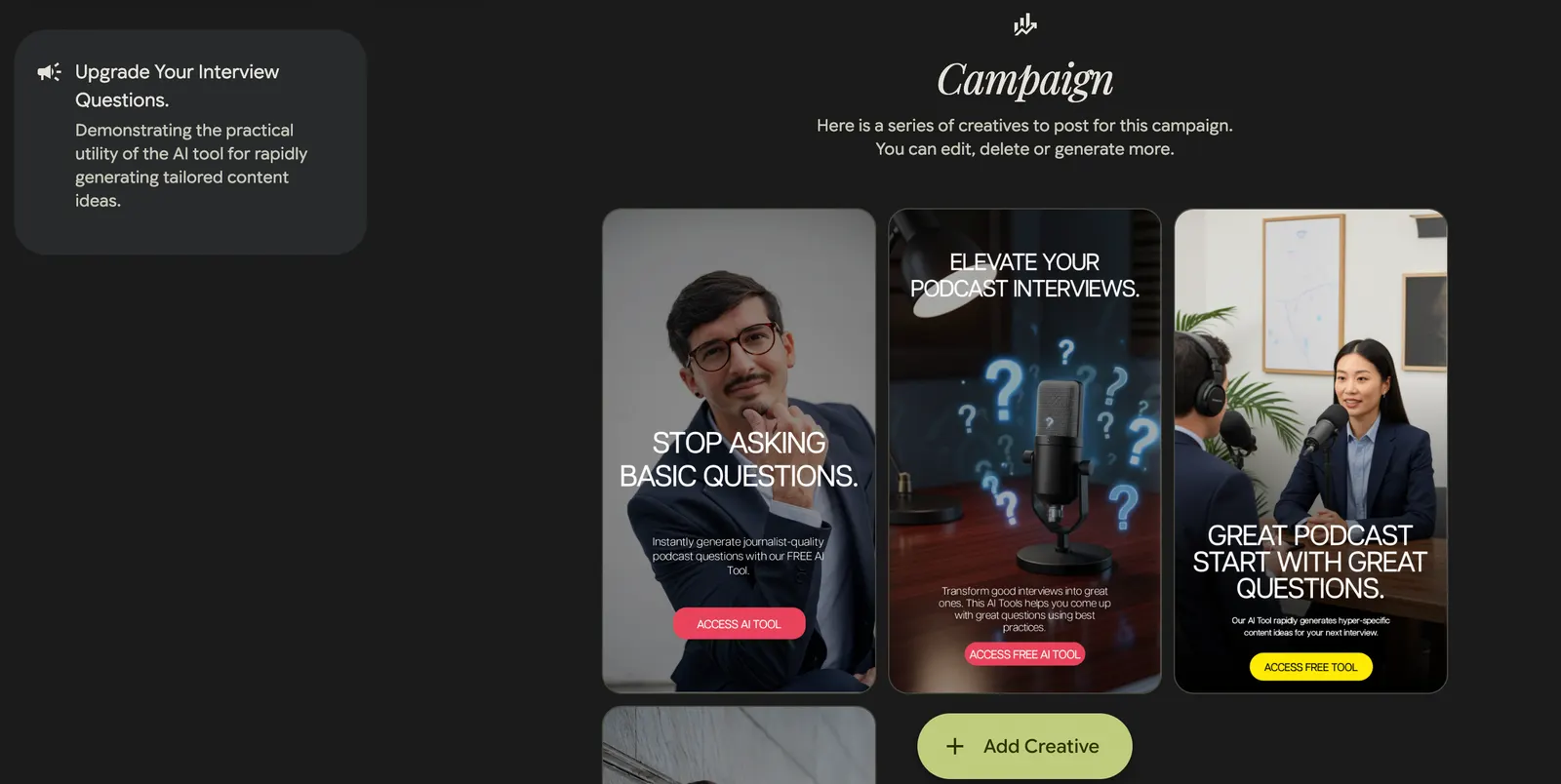
After submitting your campaign brief, Pomelli analyzes your request and generates three distinct campaign concepts. This strategic layer happens before any design work begins, ensuring your visuals align with sound marketing strategy.
Three Campaign Concepts Generated:
- “What Podcast Guests Wish You’d Ask” - Highlights specific high-value scenarios where the tool excels
- “Stop Sounding Generic” - Focuses on the problem of bland interview questions
- “Upgrade Your Interview Questions” - Emphasizes improvement and professional development
Each concept represents a different psychological angle and value proposition. The tool doesn’t just create pretty pictures—it thinks strategically about how to position your offer.
For this campaign, “Upgrade Your Interview Questions” proved most effective because it frames the tool as a professional enhancement rather than fixing a problem, which resonates better with successful podcast hosts who may be defensive about their current approach.
Customizing and Editing Your Designs
Four Editable Components
Every Pomelli design includes four elements you can customize:
- Background Image - Can be replaced with other brand images or AI-generated alternatives
- Header/Headline - The primary message, typically 6-12 words
- Description/Body Copy - Supporting details, usually 15-30 words
- Call-to-Action Button (optional) - Drives the desired action
Refining Headlines and Copy
The initial designs often need refinement. Pomelli’s AI is sophisticated but doesn’t always nail messaging on the first try. Here’s how to iterate:
Original AI-Generated Headline: “The Story Behind Trust: Tailor Content Zero Draft”
Problem: Abstract, jargony, doesn’t communicate clear benefit
Refined Through Prompting: “Great Podcasts Start with Great Questions”
Why This Works Better: Clear, benefit-focused, aspirational but achievable
You can regenerate headlines by providing specific prompts like:
- “Feature the practical component of my tool”
- “Emphasize how the tool helps podcasters ask great questions and sound smart”
- “Focus on outcomes rather than features”
Typography and Layout Adjustments
Pomelli allows precise control over typography without requiring design expertise:
Common Adjustments:
- Header size: Typically needs to be between 28-40 pixels for social media ads
- Body text: 14-18 pixels for readability
- Line height: 18-22 for description text prevents cramping
- Color: Always ensure sufficient contrast (white text on dark backgrounds, dark text on light backgrounds)
Pro Tip: When you increase body text size, watch for text cutoff issues. Pomelli sometimes truncates longer descriptions when size increases. If this happens, either shorten the copy or reduce the text size slightly.
Adding Call-to-Action Buttons
Converting designs to action-oriented ads requires clear CTAs. Pomelli can generate CTA buttons dynamically:
How to Add CTAs:
- Click “Generate Call to Action” on any design
- Pomelli adds a button based on campaign context
- Edit the button text to match your specific offer
CTA Best Practices:
- Use action verbs: “Access Free Tool” rather than “Learn More”
- Be specific: “Build Yours” vs. “Get Started”
- Match the promise: If promoting a free tool, say “Access” not “Buy”
For the podcast tool campaign, “Access Free Tool” outperformed generic options like “Learn More” because it clearly communicated both the action and the value proposition.
Generating Custom Images with AI
When to Use AI Image Generation
Pomelli integrates Gemini Flash 2.5 (Google’s AI image generation model) directly into the design workflow. This is particularly valuable when:
- Your brand image library is limited
- You need specific concepts not in your existing photos
- You want to test different visual approaches quickly
- Stock photography feels too generic for your brand
Creating Effective AI Image Prompts
The quality of AI-generated images depends entirely on prompt specificity:
Generic Prompt: “Person interviewing someone”
Result: Generic, stock-photo-looking images that lack brand personality
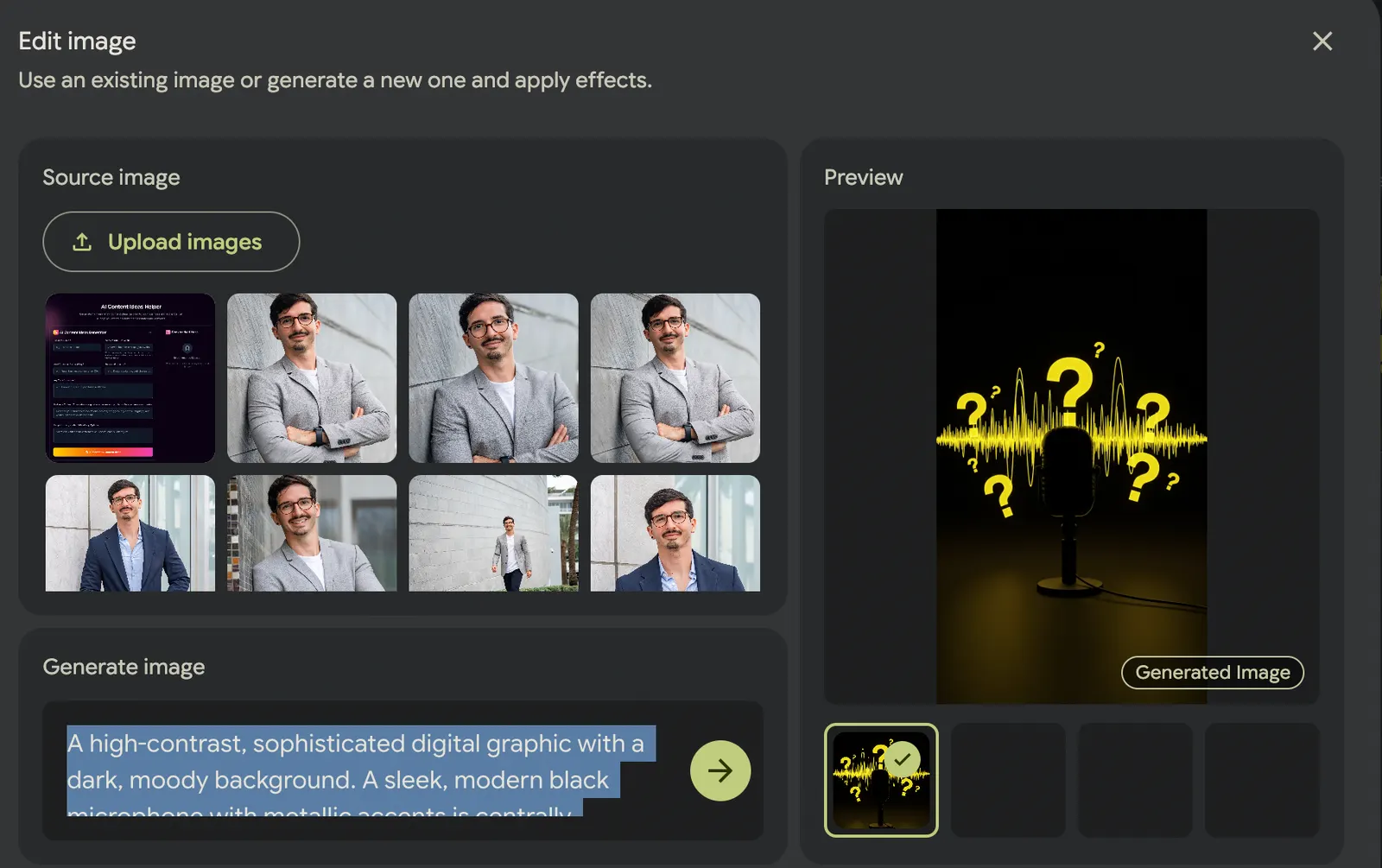
Specific Prompt: “A high-contrast, sophisticated digital graphic with a dark, moody background. A sleek, modern black microphone with metallic accents is centrally positioned, dramatically illuminated from the side to cast a long, sharp shadow. Overlaying the scene is an abstract, vibrant digital waveform graphic, stylized question marks. These question marks glow brightly, rendered in a striking, vibrant yellow (#ffeb00) against the dark backdrop, conveying insight and transformation.”
Result: More conceptual, visually interesting images that communicate the tool’s purpose symbolically
Best Practices for AI Image Prompts:
- Specify art style (realistic, graphic, abstract, illustrated)
- Include relevant objects or symbols
- Describe the mood or feeling
- Mention composition elements (floating, centered, close-up)
Pomelli typically generates 3-4 image options per prompt. Review all options before selecting, as the variations can dramatically change the design’s effectiveness.
Managing Design Versions and Iterations
Version History System
Pomelli maintains a complete version history for each design concept, allowing you to:
- Compare different iterations side-by-side
- Return to previous versions if an edit doesn’t work
- Track the evolution of your design thinking
- Test multiple approaches with stakeholders
This versioning proves invaluable when working with clients or team members who want to see the creative evolution or return to earlier concepts.
Prompt Engineering for Better Results
The quality of Pomelli’s output correlates directly with prompt quality:
Strong Prompt: “Generate ideas for an ad campaign to drive qualified traffic to my free AI tool, the Podcast Interview Question Optimizer. This AI tool helps podcast hosts generate great questions to ask their guests or improve the questions they are planning to ask using journalism best practices. Target audience is established podcast hosts with 1,000+ downloads per episode who want to improve interview quality and audience engagement.”
What Makes a Strong Prompt:
- Specific goal (drive traffic, generate leads, build awareness)
- Clear target audience (established podcast hosts)
- Detailed value proposition (better questions through journalism)
- Context about the offer (free tool, not a paid service)
- Success metrics implied (downloads, engagement)
Is Google Pomelli Free?
Yes. As of September 2026 Pomelli is a Google Labs experiment and costs nothing: no paid tier, no subscription, no credit card. Google has not announced pricing for after the beta, so treat “free” as “free for now” — export and save the assets you care about.
Can You Use Pomelli Without a Website?
Yes. When you create your Business DNA, Pomelli offers three starting points: from a website, from scratch, or from a template. If you choose “From scratch”, you upload files — a logo, product photos, past designs — and Pomelli builds your brand profile from those instead of a URL.
A website still gives the best result, because Pomelli can read your fonts, colors and tone of voice in one pass. If you start from scratch, plan to correct the colors and fonts by hand.
What Are Pomelli Photoshoot and Animate?
Photoshoot starts from one image of your product — a phone photo is enough, or a product page URL — and generates studio-style and lifestyle shots around it. You can save the results to your Catalog and build campaigns from them.
Animate takes a finished static design and turns it into a short video, using Google’s Veo video model. It is the quickest way to get a moving version of a design for Reels, Shorts or TikTok.
How DTC Brands Can Use Pomelli for Ad Creative
We run performance marketing for DTC brands, and the constraint is almost never budget — it is creative volume. Ad platforms reward accounts that keep feeding them new angles, and most in-house teams cannot shoot fast enough. This is where Pomelli earns a place in the workflow:
- Build your Business DNA from your store URL. Pomelli picks up your fonts, palette and tone from your storefront, so every design starts on-brand.
- Add your hero products to the Catalog by pasting their product page URLs.
- Run a Photoshoot on each hero product to get lifestyle and studio variations without booking a studio.
- Create one campaign per angle — new drop, best seller, gifting, back in stock — and let Pomelli draft several designs for each.
- Animate the strongest designs so you have motion versions for Reels and TikTok.
- Export and test the variations as separate ads, then put budget behind the winners.
Two honest caveats. Check every generated image against the real product: AI can change a label, a color, a texture or the proportions of a product, and an ad that misrepresents what you sell brings returns and policy trouble. And treat Pomelli as a concepting tool, not a replacement for a shoot — use it to find the angle that works, then produce that angle properly with real people using the product.
Ready to Transform Your Design Process?
Google Pomelli is available now at labs.google.com/pomelli. No credit card required, no software installation, and no learning curve beyond the 30-minute tutorial above.
For brands and agencies looking to scale their visual content without scaling their design team, Pomelli might be the most impactful free tool you adopt this year.
Watch the complete Pomelli walkthrough to see every feature in action, including live campaign creation, AI image generation, and design refinement techniques.
Running ads for a DTC brand and want creative that is tested, not guessed? See how we run paid media on Meta, Google, TikTok, Pinterest and Amazon.
Hugo Sanchez is the founder of MoonDesk Media, a Miami-based DTC performance marketing agency.